Google Block Breaker: How the Game Works and How to Play

Looking for a quick game while using Google Search? Google Block Breaker turns the search page into a small arcade experience. Instead of downloading a game or opening a separate gaming platform, you can play the brick-breaking style game from Google’s Search interface when the feature is available.
The idea comes from a familiar type of arcade gameplay. A ball travels around the screen while you guide a paddle near the bottom. Your task is to keep the ball from escaping while using it to knock down the blocks above.
Google’s version adds its own look and a few extra gameplay elements, including special effects and additional lives. It was announced as a new Search game in January 2025.
There is one important detail to understand before you start: Google Block Breaker is not the same thing as every website or app that uses the name “Block Breaker.” Many independent games use similar names and mechanics.
Finding Google Block Breaker in Search
You don’t have to hunt through an app store for the Google version.
Start with Google Search and enter Block Breaker. When Google’s interactive game result is being served to you, you can open it and start playing.
This is different from clicking an ordinary website result. A third-party page may also offer a block-breaking game, but that does not make it Google’s own game.
The original launch report said the game could be used through desktop and mobile web, as well as through Google’s Android and iOS app.
If you are searching from a phone, the experience can feel more natural because you can interact with the paddle directly on the screen.
What You Actually Do During a Game
There isn’t a complicated story or character system to learn.
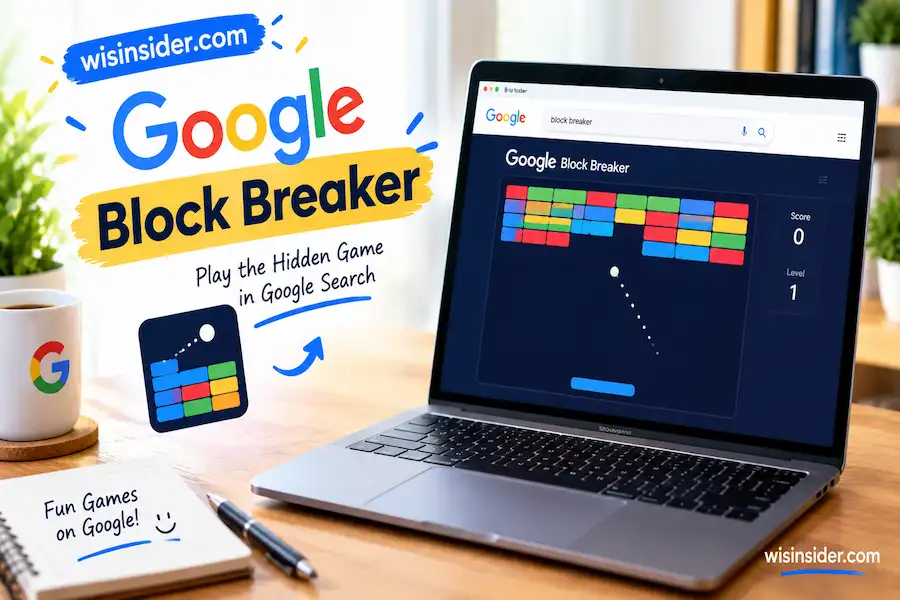
The screen gives you a playing area, a paddle and a moving ball. Blocks occupy part of the upper area. When the ball reaches a block, it can remove that block and continue moving.
Your attention stays focused on two things:
Where is the ball going?
and
Where should the paddle be when the ball comes back down?
That second question is where most of the challenge comes from.
A beginner may simply move the paddle back and forth. After a few attempts, however, it becomes more useful to watch the ball’s trajectory and move into position before it reaches the bottom.
That small change can make the game feel much more manageable.
Playing on a Computer
The desktop version uses the keyboard for paddle movement.
The left and right arrow keys move the paddle across the playing area. The launch reporting also noted that the desktop game can be displayed in a larger window.
You don’t need a gaming keyboard or special mouse.
A normal keyboard is enough.
If you’re playing on a laptop, keep your fingers close to the two arrow keys. You will usually get better results from short movements than from holding one direction for too long.
The ball can change its path after hitting blocks, so its eventual landing position isn’t always obvious several seconds in advance.
Playing on a Phone
The mobile experience works differently because there is no physical keyboard controlling the paddle.
Google’s version supports direct interaction on mobile, allowing you to move the paddle through touch.
This can actually make the game feel more immediate.
Instead of thinking about which key to press, you can watch the lower portion of the screen and move the paddle toward the approaching ball.
A larger phone screen can give you a little more room to see what is happening. On a smaller display, keeping your eyes on the ball becomes even more important.
Why the Ball Is the Real Challenge
Breaking blocks sounds like the main objective, but keeping the ball alive is usually the bigger concern.
Imagine the ball is moving toward the left side. If you wait until the last instant to move the paddle, you may not have enough time to reach it.
A better habit is to read the ball’s direction early.
You don’t need to predict its entire journey. Just estimate where it is likely to reach the bottom and position the paddle accordingly.
The rebound angle also matters. The ball does not always return along the same path from which it came. A small change in where the ball meets the paddle can affect its next movement.
This is why controlled positioning can be more useful than frantic movement.
Blocks Aren’t All Just Decoration
Google’s game uses several rows of colored blocks, with the design using Google’s familiar color palette.
But the board isn’t limited to identical targets.
The launch report noted that some blocks are harder to break, while other blocks can trigger special effects.
That means you should pay attention to what happens after a particular block is hit.
The game can shift from a simple one-ball experience into something much busier when special effects become active.
For a new player, this can initially feel confusing. After a few rounds, it becomes easier to recognize what is happening and decide where to focus.
Special Effects Can Change the Pace
One of the features that separates Google’s version from a very basic brick-breaker game is the presence of special effects.
Reported examples include:
- additional balls
- a larger paddle
- TNT
- dual blasters
- extra lives
These features were documented in reporting about the game’s January 2025 launch.
You don’t need to memorize every effect before playing.
Instead, think of them as temporary changes that can give you more options or make the screen more active.
More Than One Ball
An additional ball can increase the amount of damage being done to the board.
It also creates another thing to watch.
If you suddenly have several balls moving around, don’t forget about the one that can reach the bottom first. Losing track of the dangerous ball is an easy way to lose a life.
A Bigger Paddle
A larger paddle gives you a wider area for catching the ball.
That extra space can be especially useful when the ball is moving quickly.
If you get this effect, don’t assume you can stop paying attention. The wider paddle provides more margin for error, but you still need to position it correctly.
TNT and Other Effects
TNT introduces a more explosive way of interacting with the board.
Dual blasters add another unusual element to the game. The original report compared that feature to a small Space Invaders-style touch.
These additions are part of what gives Google’s version its own identity rather than making it simply a plain copy of an old brick-breaker layout.
Keeping Your Lives Matters
You don’t have unlimited attempts during a run.
The game was reported to give players three lives at the beginning, with opportunities to gain additional lives during gameplay.
That changes how you should approach difficult moments.
If you are chasing one last group of blocks but are also in danger of missing the ball, protect the ball first.
A few remaining blocks are not worth throwing away a life unnecessarily.
Once you become comfortable with the basic controls, this becomes one of the easiest habits to develop.
What Happens as You Progress?
The board isn’t simply identical from beginning to end.
The reported launch behavior says that additional rows appear after a completed round.
This is worth mentioning because many websites make very specific claims about the total number of levels in Google Block Breaker.
Those claims should be treated carefully.
There isn’t a reliable reason to present an exact level count as an official Google specification when the available reporting describes progression in terms of rounds and additional rows.
So if you see a page claiming an exact number such as 100 or 150 levels, don’t automatically assume that figure applies to Google’s Search game.
It may describe a different Block Breaker title.
How to Improve Your Score
There isn’t a secret button that suddenly produces a huge score.
Improvement mostly comes from staying alive longer and handling the board more efficiently.
Start by reducing unnecessary paddle movement.
When the ball is coming toward you from one side, move toward its expected landing position rather than sliding continuously across the screen.
Next, watch what happens after each rebound.
If you start recognizing the direction the ball is taking, your reactions become less random.
Another useful habit is to avoid becoming distracted by special effects. They are helpful, but the ball still determines whether your run continues.
The simplest rule is:
Protect the ball first. Clear blocks second.
That mindset is more useful than trying to perform risky shots simply because the board looks nearly finished.
A Simple Strategy for New Players
If you’re playing Google Block Breaker for the first time, don’t worry about chasing a huge score immediately.
Spend your first few attempts learning the movement.
Notice how quickly the ball travels.
Notice how much the paddle moves when you use the controls.
Notice how the ball changes direction after contacting different parts of the paddle.
Once those movements become familiar, start paying more attention to the blocks.
You will naturally become faster because you’re no longer thinking about every individual control.
The game then becomes less about pressing keys and more about reading what is happening on the screen.
Why You Might Not See Google Block Breaker
This is where searchers can easily get confused.
You may type the correct phrase and still find several websites instead of the interactive Google game.
That does not necessarily mean you searched incorrectly.
Google Search contains many games and interactive features, and their availability can change. The January 2025 reporting confirmed the game across desktop/mobile web and the Google app on Android and iOS at launch.
If you can’t see the game, try a few basic checks.
Use a current browser and search again.
Try another browser if the interactive element doesn’t load.
If you’re using a phone, try the Google app as well as a mobile browser.
Also check whether you accidentally opened a third-party Block Breaker website.
The name alone isn’t proof that a page belongs to Google.
Google Block Breaker Is Not the Same as Every Breakout Game
The basic idea is much older than Google’s Search version.
The classic Breakout formula uses a paddle, a bouncing ball and blocks that disappear as they are hit. Numerous games have used this formula over the years.
Google’s current Search game follows that familiar concept but adds its own visual design and special effects.
This is also why you may see different instructions online.
One Block Breaker game might have dozens of levels.
Another might have a shop.
Another might use coins.
Another might have different power-ups.
None of those features should automatically be attributed to Google’s Search game.
When researching a specific mechanic, always check that the source is actually discussing Google’s version.
Google Block Breaker and Atari Breakout
There is another reason the name can cause confusion: Atari Breakout.
Atari’s Breakout is one of the well known games associated with the paddle-and-ball format.
Google previously offered an Atari Breakout Easter egg through Google Images. That older experience is separate from the newer Block Breaker game.
The newer Google Search game was reported in January 2025 and was described as taking inspiration from Atari’s Breakout.
So the relationship is easy to summarize:
Breakout is the classic game concept.
Atari Breakout is Atari’s famous version.
Google’s Atari Breakout Easter egg was an older Google Search/Images experience.
Google Block Breaker is the newer Search game.
They share the same general arcade idea, but they shouldn’t be treated as one identical game.
Is There an Official Google Block Breaker World Record?
Be careful with websites claiming an “official Google Block Breaker world record.”
An impressive score posted on a random website or social account does not automatically make it a Google-recognized record.
There is no reliable official leaderboard identified in the launch reporting that establishes a universal world-record score for this Search game.
You can still compete with friends or keep track of your own best run. Just distinguish a personal high score from an officially recognized record.
That distinction is especially important because third-party Block Breaker games can use completely different scoring systems.
FAQs
Is Google Block Breaker a real Google game?
Yes. The game was reported as a Google Search addition in January 2025. It was presented as an interactive Search game rather than a conventional standalone download.
Do I need to install anything?
The Search version is designed to run through Google’s supported Search experience, so you don’t need to install a separate Block Breaker game just to play it.
Be careful with downloads from unrelated websites using Google’s name.
Can I play it on a phone?
The game was reported for mobile web and the Google app on Android and iOS. Touch interaction is used to control the paddle on mobile.
What controls are used on a PC?
The reported desktop controls are the left and right arrow keys.
How many lives does the game give you?
The launch reporting says players begin with three lives and can gain additional lives through gameplay.
Does Google Block Breaker have 100 or 150 levels?
Don’t rely on those numbers unless they are verified for the specific Google Search version. Available reporting describes additional rows appearing after completed rounds rather than establishing a definitive official total level count.
Is Google Block Breaker the same as Atari Breakout?
No. The games use a related paddle-and-ball concept, but Google’s current Block Breaker is a newer Search experience. The older Atari Breakout Google Easter egg was a separate experience.
Why am I seeing another Block Breaker game?
Because “Block Breaker” is a common game name. Search results can include independent browser games and mobile titles. Check the source carefully before assuming that a particular feature belongs to Google.
Final Take
Google Block Breaker works because it takes a game concept that requires almost no explanation and puts it directly into Search.
You don’t need to learn a complicated control system. Move the paddle, follow the ball, protect your lives and use special effects when they appear.
The more important trick is knowing which Block Breaker you’re actually playing. Google’s Search game is often mixed together online with unrelated games and with the older Atari Breakout Easter egg.
Once that distinction is clear, the experience is much easier to understand.
If the game appears in your Google Search results, give it a try. Your first few attempts may be mostly about learning the ball’s movement. After that, the challenge becomes keeping the run alive while clearing the board as efficiently as possible.
For more useful tips, you can also explore WISInsider.