
Google Secrets: 40+ Hidden Features, Tricks & Settings You Didn’t Know About

I still remember the first time my internet dropped and a tiny pixel dinosaur showed up on my screen. I had no idea Google had games hiding inside it. That small moment turned into a habit. Every time I got bored during a slow work afternoon, I would type something odd into Google just to see what happened. Most people do the same thing without even noticing. You search for something simple, and suddenly the page tilts, spins, or turns into a full game. It feels like finding a secret door in a house you thought you already knew.
That curiosity is exactly why this list exists. Google is not just a search engine. It is packed with small surprises, smart tools, and privacy settings that most people never touch. Some of these secrets are just for fun. Others can save you time or protect your personal data. In this guide, I am sharing every kind of Google secrets I have found and tested myself, from classic Easter eggs to newer AI-powered tools. Let’s dig in.
Key Takeaways
- Google hides dozens of fun Easter eggs, games, and jokes inside Search
- Some tricks, like Zerg Rush, now only work through elgooG, not live Search
- Google also hides privacy tools most people never open
- AI Mode and Search Labs are the newest layer of “Google secrets” in 2026
Quick Reference Table of Google Secrets
| Secret | What It Does | How to Try It |
| Do a Barrel Roll | Spins the search page | Search “do a barrel roll” |
| Google Gravity | Makes search elements fall | Search “Google Gravity” then hit “I’m Feeling Lucky” |
| Pac-Man | Playable arcade game | Search “Pac-Man” |
| Elgoog | Mirror site with retired tricks | Visit elgoog.im |
| Auto-Delete Activity | Clears your search history automatically | Google Account → Data & Privacy |
| AI Mode | AI-powered search experience | Search Labs or the AI Mode tab |
Classic Google Easter Eggs Everyone Should Try
Google’s developers love hiding small jokes inside search. These are the most popular ones, and they still work today.
Do a Barrel Roll
Type ”Do A Barrel Roll” exact phrase into Google. The whole search page spins in a full circle. It is a nod to an old video game line that became an internet joke.
Askew
Search “askew” and watch the page tilt slightly to one side. It fixes itself once you move on.
Google in 1998
This one takes you back in time. Search “Google in 1998” and see an old style version of the homepage.
Festivus
Search “Festivus” and a small pole appears on the screen. It is a fun nod to a fictional holiday from a popular TV show.
Blink HTML
Search “blink html” and watch bold text blink on the page, just like websites did in the 1990s.
Hidden Google Games You Can Play Right Now
If you want something more interactive, Google has full mini-games built into search.
Pac Man
Search “Pac Man” and click play. Move through the maze and avoid the ghosts, just like the arcade original.
Solitaire
Search “Solitaire” to open a full card game right inside your search results. Pick easy or hard mode.
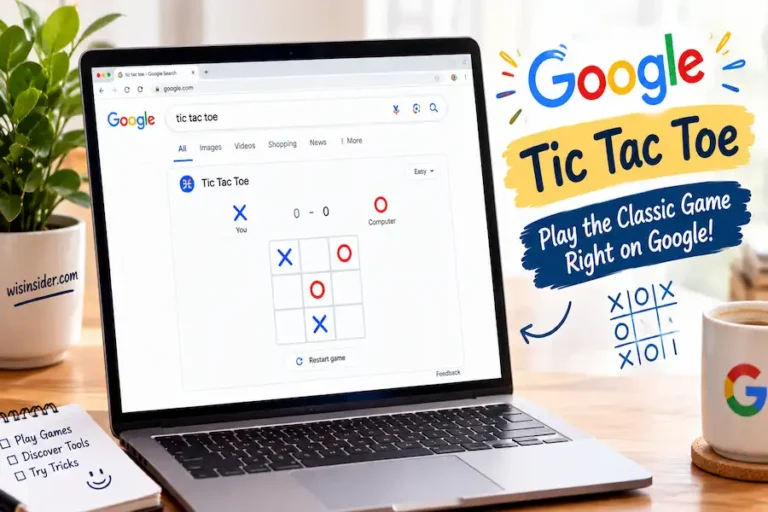
Tic Tac Toe
Search “Tic Tac Toe” to play against the computer or a friend. It is simple, fast, and great for a short break.
Minesweeper
Search “Minesweeper” to test your memory and logic. Avoid the hidden bombs and clear the board.
Snake
Search “Google Snake” to play the classic mobile-style snake game.
Google Dinosaur Game
This one shows up when your Wi Fi disconnects. You can also search “dinosaur game” to play it any time. Press space to jump over cacti.
Rare and Lesser Known Google Secrets
These tricks get less attention, but they are just as fun.
Anagram
Search “anagram” and Google jokes back with “Did you mean nag a ram.” It is a playful nod to wordplay.
Zerg Rush
Zerg Rush trick fills your screen with small circles attacking your search results, based on the game StarCraft. Click them fast before they take over.
Atari Breakout
Searching “Atari Breakout” once turned Google Images into a full brick breaking arcade game.
Thanos Snap
This older Easter egg let users search “Thanos” and click the Infinity Gauntlet to make half the search results disappear.
Pop Culture Jokes
Try searching phrases like “the one ring” or a favorite movie quote. Google sometimes replies with a witty pop culture nod instead of a normal answer.
A quick note: Some Google Easter eggs come and go. Zerg Rush, Atari Breakout, and Thanos Snap don’t always trigger directly on Google Search anymore. If a search doesn’t work, try elgooG instead it keeps these retired tricks alive.
What Is Elgoog? (And Other Google Secret Sites)
Elgoog, which is “Google” spelled backward, is a fan made website. It is not owned by Google. Elgoog is best known today for preserving Easter eggs that Google itself has quietly removed from live search, like Zerg Rush and Thanos Snap. The site mirrors many search tricks and even flips your entire screen upside down for fun. It is a good place to explore extra tricks, but remember it is a third-party project, not an official Google product.
Google Search Secrets for Everyday Use
Not every secret is about fun. Some of these tools can save you real time.
Built In Timer and Stopwatch
Search “timer” or “stopwatch” and Google gives you a working tool instantly. No app needed.
Instant Calculator
Type any math problem directly into the search bar. Google solves it on the spot and even shows a full calculator.
Unit and Currency Converter
Search something like “50 miles to km” or “100 USD to EUR” and get an instant answer.
Flight and Package Tracking
Paste a flight number or tracking number into search, and Google shows live status updates.
Color Picker
Search “color picker” to open a tool that shows hex codes for any color. This is a hidden gem for designers and bloggers.
Google Doodles
Google also changes its logo into a small interactive drawing, called a Doodle, to mark holidays and events. Many Doodles hide their own mini games too.
Hidden Privacy and Account Secrets in Google
Most articles skip this part completely, but it matters just as much as the fun stuff.
Auto Delete Activity
Inside your Google Account settings, under Data & Privacy, you can set your search and location history to delete automatically every 3, 18, or 36 months.
Results About You
Google lets you request removal of personal information, like your phone number or address, from search results. You can now trigger a removal request straight from the three dot menu next to any search result, without digging through account settings first.
My Ad Center
This setting lets you control what kind of ads Google shows you, based on your interests and activity.
Taking five minutes to check these settings can make a real difference in how much of your data stays private.
Secrets Across the Google Ecosystem
Google’s secrets are not limited to the search bar. Other apps have hidden features too.
Gmail Scheduled Send
Write an email now and schedule it to send later. This is built directly into Gmail’s send button.
Google Maps Offline Mode
Download a map before you travel so it still works without internet.
Google Photos Locked Folder
Hide private photos in a folder that needs a passcode or fingerprint to open.
Chrome Tab Groups
Organize dozens of open tabs into color-coded groups so your browser stays clean.
New Google Secrets in the AI Era
Google keeps changing, and 2026 has brought new tools worth knowing about.
AI Mode
This gives you a more conversational search experience, where you can ask follow-up questions in the same search session.
Search Labs
This is where Google tests new features before releasing them to everyone. You can opt in and try tools early.
These features are newer, so not every searcher knows about them yet. That makes this section one of the freshest parts of this guide.
FAQ
What is the most famous Google Easter egg?
“Do a Barrel Roll” is one of the most searched and most recognized Google Easter eggs.
Why doesn’t Zerg Rush or Thanos Snap work anymore?
Google has removed some older interactive Easter eggs from live Search. Try elgooG to play them instead.
Can I turn off Google search tricks?
There is no single switch to turn off Easter eggs. They only appear when you search a specific phrase.
Is elgoog an official Google website?
No. Elgoog is a fan made site that mirrors and preserves Google tricks, including ones Google has retired.
Does Google track everything I search?
Google can track search activity, but you can control this through auto-delete settings and activity controls in your account.
Conclusion
Writing this list reminded me why I fell in love with the internet in the first place. Small surprises like a spinning search page or a hidden Pac Man game make an everyday tool feel a little more human. But after spending years writing content and testing tools like these, I have also learned that the quiet features matter just as much as the fun ones.
Knowing how to protect your privacy or save time with a built-in calculator can matter more than any game ever will.
Google keeps adding new layers every year, from AI Mode to smarter privacy controls. My advice is simple keep exploring.
Try one trick from this list today, whether it’s spinning your search page or checking your privacy settings for the first time. You might be surprised how much this one search engine still has hidden beneath the surface.