Minecraft Google Easter Egg: How to Activate and Play It

Have you searched for Minecraft on Google and wondered where the little grass block comes from? If you cannot find it or do not know what to click, you are not alone. The Minecraft Google Easter egg is easy to miss because it appears as a small interactive feature inside the Search results. It is also different from playing the normal Minecraft game.
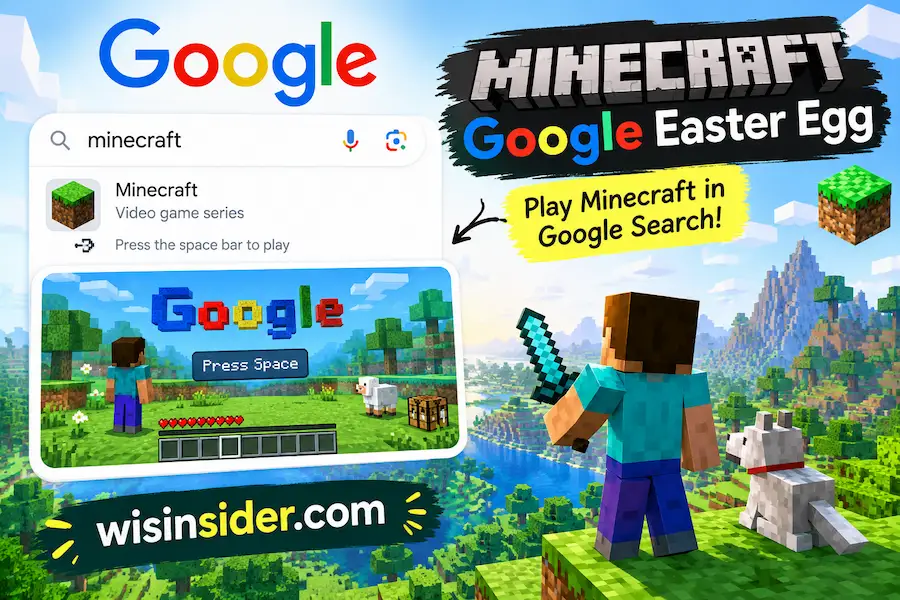
The good news is that the basic process is simple. Search for Minecraft on Google, wait for the results page to load, and look for the grass-block icon. When it appears, click it to start the Easter egg. You can then mine eligible parts of the Search page, reveal Minecraft scenes, upgrade your pickaxe, and find things such as ores and TNT. Google introduced the feature for Minecraft’s 15th anniversary in 2024.
What Is the Minecraft Google Easter Egg?
The Minecraft Google Easter egg is a small interactive experience built into Google Search. It is not a separate Minecraft game that you download or install.
After you search for Minecraft, a grass block can appear near the bottom of the Search page. Clicking it starts the experience. Steve’s fist then appears, and parts of the Search page become mineable.
The Easter egg uses familiar Minecraft ideas such as blocks, mining, pickaxes, caves, ores, TNT, and different Minecraft environments.
It is best understood as a Google Search Easter egg, not as Minecraft Java Edition or Bedrock Edition.
How to Activate the Minecraft Google Easter Egg
You do not need a Minecraft account, launcher, command, or special URL to try the Easter egg.
Open Google Search
Open Google in your browser.
Search for Minecraft
Type:
Minecraft
Then open the Search results.
Wait for the Page to Load
Give the results page a few seconds to finish loading.
A small Minecraft grass-block icon can appear near the bottom of the page. The exact position can vary with the Search layout and device.
Click the Grass Block
Click or tap the grass block.
The icon changes to an X, and the interactive mining experience begins. Steve’s hand also appears on the screen.
How to Play the Minecraft Google Easter Egg
Once the Easter egg is active, you do not simply click anywhere on the page.
You need to find a mineable Search result or page section.
On desktop, move your mouse over different parts of the Search page. When you reach an eligible area, the pointer changes into a Minecraft-style crosshair. That is your signal that the section can be mined.
Click the area once.
The selected Search element breaks apart with a Minecraft-style mining animation. A Minecraft scene can then appear behind it.
Unlike normal Minecraft, you do not need to hold the mouse button down. A single click or tap can break a mineable Search result.
The interaction can work with parts of the Knowledge Panel, individual Search results, and some articles shown in Google News. Sponsored results cannot be mined.
While the Easter egg is active, normal links and buttons on the page do not work in the usual way.
What Happens After You Mine a Search Result?
Breaking a Search result reveals a Minecraft-style scene.
The scene contains blocks that you can continue mining. As you move deeper, you can find different environments and materials.
The original launch report mentioned caves, ores, TNT, and The Nether. The detailed Minecraft Wiki also documents several other Minecraft-style scenes and areas.
You can also scroll down the Search page to expose more of the experience.
This is important because the Easter egg is not limited to the first section you see. More interactive content can appear farther down the page.
What Can You Find in the Minecraft Google Easter Egg?
The Easter egg contains more than simple grass and dirt blocks.
Depending on the scene, you can encounter Minecraft-style environments and blocks such as:
- Grass blocks
- Dirt
- Stone
- Deepslate
- Iron ore
- Diamond ore
- Gold ore
- Redstone ore
- Ancient debris
- TNT
- Snow and ice
- Logs and planks
- Nether-related areas
- Caves
The documented scenes include different Minecraft environments, including forests, snowy areas, caves, the Nether, and The End.
You do not need to find every scene to complete the Easter egg. The main appeal is exploring the Search page and seeing what appears as you mine.
Minecraft Google Easter Egg Pickaxe Progression
One of the more interesting parts of the Easter egg is the pickaxe progression.
You start with your fist. Breaking certain blocks upgrades your tool.
The documented progression is:
Fist → Wooden Pickaxe → Stone Pickaxe → Iron Pickaxe → Diamond Pickaxe → Netherite Pickaxe
Here is how the progression works:
| Tool | How the upgrade happens |
|---|---|
| Fist | Your starting tool |
| Wooden Pickaxe | Break a suitable log or plank |
| Stone Pickaxe | Break stone or deepslate |
| Iron Pickaxe | Break iron ore or deepslate iron ore |
| Diamond Pickaxe | Break diamond ore or deepslate diamond ore |
| Netherite Pickaxe | Break ancient debris |
When a tool upgrades, the Easter egg shows an experience-style animation and plays an upgrade sound. Netherite is the final pickaxe level documented for the experience.
This progression is one of the details that makes the Easter egg feel more like Minecraft instead of being only a visual animation.
What Does TNT Do in the Minecraft Google Easter Egg?
TNT is one of the more interesting things you can find while mining.
When you click or tap TNT, its fuse starts.
After about three seconds, it explodes and can break blocks in a 3×3 area around it.
The TNT also affects your score.
The documented scoring system gives:
- 1 point for each block mined
- 7 points for each TNT explosion
The score counter appears after you have gained more than 20 points.
Are All Blocks Mineable?
No.
Some blocks in the Easter egg have special behavior instead of being mined normally.
The documented non mineable or special blocks include:
- Bedrock
- Carved pumpkin
- Chiseled bookshelf
- Crafting table
- Furnace
- Redstone lamp
Some of these can be interacted with.
For example, clicking a furnace can change its lit state. A redstone lamp can turn on or off, and a carved pumpkin can change into a Jack o’Lantern.
This is another reason not to assume that every object on the screen works in exactly the same way.
Does the Minecraft Google Easter Egg Work on Mobile?
The Easter egg has been documented on mobile devices as well as desktop.
To try it on a phone:
- Open Google Search.
- Search for Minecraft.
- Wait for the results page to load.
- Look for the grass-block icon.
- Tap it if it appears.
- Tap eligible areas to mine them.
The controls and Search layout can differ between mobile and desktop.
If you cannot find the grass block on your phone, try the same search on a desktop browser. This can help you determine whether the issue is related to the current mobile Search layout or feature availability.
Does the Minecraft Google Easter Egg Work on PC?
You can use the Easter egg on a desktop browser when it is available.
Search for Minecraft on Google and look for the grass block.
After activating it, move your mouse over the Search results.
When the pointer changes into the Minecraft-style crosshair, click the mineable area.
The crosshair is an important visual signal. If the pointer does not change, the area you are pointing at may not be mineable.
Minecraft Google Easter Egg Not Working? Try These Fixes
One of the most common problems is simple: you search for Minecraft but the grass block does not appear.
That does not always mean you are doing something wrong.
Try these steps.
Search for Minecraft Directly
Use Google Search and type:
Minecraft
Do not rely on an old saved Search URL.
Wait a Few Seconds
The grass-block icon may take a few seconds to appear after the Search page loads.
Refresh the Search Page
Reload the results page and search for Minecraft again.
Try Another Browser
If the feature does not appear, test another modern browser.
Try Another Device
If you are using a phone, try a desktop. If you are using a desktop, try a mobile browser.
Check Browser Extensions
Some extensions can modify or block parts of a Search page. Temporarily disabling Search-related extensions can help rule out that possibility.
Make Sure the Feature Is Available
This is the most important point.
The Easter egg was introduced as part of Minecraft’s 15th-anniversary celebration in 2024. Recent guides continue to document it, but Google Search features can change or disappear. Its availability should not be treated as permanently guaranteed.
If the grass block never appears after trying different devices and browsers, the feature may simply not be available in your current Search session.
Why Does Clicking the Minecraft Easter Egg Do Nothing?
The grass block may activate correctly while some parts of the page still cannot be mined.
That is normal.
Move your cursor around the Search results and wait for the pointer to change into the Minecraft-style crosshair.
Then click.
Not every section of the page is a mineable target. Sponsored results, for example, cannot be mined.
If the cursor never changes, try another section of the Search page.
Is the Minecraft Google Easter Egg Still Working?
The feature was launched in May 2024 as part of Minecraft’s 15th-anniversary celebration. Current 2026 guides still document the Easter egg, but Google does not guarantee that an anniversary Search feature will remain available forever.
For that reason, the safest answer is:
It may still be available, but availability can vary.
If you search for Minecraft and the grass block does not appear, try another browser or device. If it still does not appear, Google may not currently be serving the Easter egg to your Search session.
Is the Minecraft Easter Egg the Full Minecraft Game?
No.
This is an important distinction.
The Google Easter egg is not Minecraft Java Edition or Minecraft Bedrock Edition. It does not create a normal Minecraft survival world.
You do not get:
- A full Minecraft world
- Normal multiplayer gameplay
- A standard inventory
- A normal crafting system
- A saved Minecraft world
- Minecraft commands
- Full Java or Bedrock gameplay
Instead, Google created a small interactive mining experience that uses Minecraft’s visual style and familiar mechanics.
So when people say that you can “play Minecraft on Google,” they are usually referring to this Easter egg, not the full Minecraft game.
Why Did Google Create the Minecraft Easter Egg?
Google introduced the Easter egg to celebrate Minecraft’s 15th anniversary.
Minecraft’s first version, known as Cave Game, appeared on May 17, 2009. The 15th anniversary was May 17, 2024. Google added the interactive Search feature around that anniversary.
The result was a small tribute that brought Minecraft-style mining directly into Google Search.
What Happens When You Close the Minecraft Easter Egg?
When you are finished, look for the X control.
Clicking it closes the Easter egg.
A Creeper appears, makes its familiar hissing sound, and explodes before the normal Search page returns. The grass-block icon then becomes available again when the Search page returns to its normal state.
You can also leave by closing the browser tab.
FAQs
What do I search to find the Minecraft Google Easter egg?
Search Google for Minecraft. When the feature is available, a grass block icon can appear on the Search results page.
How do I activate the Minecraft Google Easter egg?
Search for Minecraft on Google and click or tap the grass block icon when it appears.
How do I mine in the Google Minecraft Easter egg?
Activate the Easter egg, then move your mouse over the Search results. When the pointer changes into the Minecraft style crosshair, click a mineable section. On mobile, tap an eligible section.
Do I need to hold the mouse button to mine?
No. A mineable Search result can be broken with a single click or tap. This differs from normal Minecraft mining.
Can I play the full Minecraft game on Google?
No. The Easter egg is a small interactive experience inside Google Search. It is not Minecraft Java Edition or Bedrock Edition.
Why is the Minecraft Google Easter egg not showing?
The feature may not currently be available in your Search session. Try refreshing the page, using another browser or device, and searching for Minecraft directly. Google Search features can change over time.
Does the Minecraft Google Easter egg work on mobile?
It has been documented on mobile devices. However, the controls and layout can differ from desktop, and availability can vary.
What can you find in the Minecraft Google Easter egg?
You can find Minecraft style blocks, caves, ores, TNT, different environments, the Nether, and The End.
Can you upgrade the pickaxe?
Yes. The documented progression goes from a fist to wooden, stone, iron, diamond, and finally netherite pickaxes.
What happens when you click TNT?
TNT starts a short fuse and explodes after about three seconds. The explosion can break nearby blocks.
Final Thoughts
The Minecraft Google Easter egg is a small feature, but it has more depth than it first appears. When I reviewed the documented mechanics for this guide, the useful part was not simply finding the grass block. The details that matter to a user are what happens after activation: knowing which Search sections can be mined, recognizing the crosshair, understanding the pickaxe progression, finding TNT, and knowing what to do when the feature does not appear. Those details make the experience much easier to understand without confusing it with the full Minecraft game.
If you want to try it, start with the simplest step search Minecraft on Google and look for the grass block. If it appears, click it and start mining. If it does not, do not assume you missed something. The feature was created for Minecraft’s 15th anniversary celebration and its availability can change, so your browser, device, or Search session may simply not be serving it.