Ctrl Shift Windows B: What It Does and How to Use It

A black screen is scary because you cannot tell what went wrong. The fans spin, the lights glow, and the mouse may even move, yet the monitor shows nothing. At that moment, most people worry about unsaved work and a missed deadline, and many reach for the power button. That is a risky first move, because a forced shutdown can wipe out what you have not saved. There is a gentler first step, and it takes about two seconds: ctrl shift windows b.
I wrote this guide after comparing the top pages on this shortcut and reading the Reddit comment that most of them quote. I found two weak spots. The pages disagree on whether the shortcut restarts your graphics driver, and most of them give only a short list of reasons when it fails. So here you get the plain answer, the exact steps, the safety facts, a fix checklist, and backup methods.
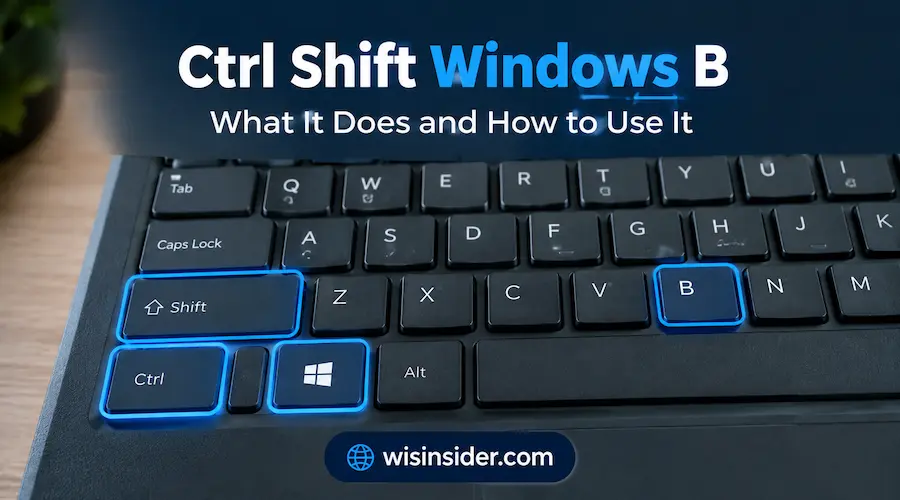
Quick answer: Hold Ctrl, Shift, and the Windows key. Then tap B once. The screen goes dark for a moment, and you hear a short beep. Windows then redraws the display. The ctrl shift windows b shortcut works on Windows 10 and Windows 11.
What Is the Ctrl Shift Windows B Shortcut?
Ctrl shift windows b is a keyboard shortcut that comes with Windows. You press four keys at the same time. These keys are Ctrl, Shift, the Windows key, and B.
People write it in many ways. You may see Win Ctrl Shift B, ctrl win shift b, Win+Ctrl+Shift+B, or ctrl+shift+win+b. All of these names point to the same shortcut. The order of the first three keys does not matter. Just tap B last.
The Windows key is the one with the flag logo. On most keyboards, you find it on the bottom row, between Ctrl and Alt. On some laptops, the key may look different. Newer keyboards also have a Copilot key. That is a different key, so make sure you press the Windows key.
When you use the shortcut, your screen blinks black for a second. You may also hear a short beep. That blink is a good sign. It means Windows got your command and started to redraw the picture.
Microsoft added this feature a long time ago. It first appeared in Windows Vista. At that time, the company wanted a quick way to wake up a blank screen on a PC that was still running. That is why many people call it the black screen shortcut.
Today, the ctrl shift windows b shortcut is still part of Windows. You do not need to install any app. You do not need to change any setting. It also works on both laptops and desktops. So it is a smart trick to learn before you ever need it.
How to Use Ctrl Shift Window B (Step by Step)
Using the ctrl shift windows b shortcut takes less than five seconds. Follow these steps.
- Check that your PC is on. Look at the fans and the power light. You can also tap the Caps Lock key. If its light turns on and off, Windows is still running.
- Hold down the Ctrl key.
- Hold down the Shift key as well.
- Hold down the Windows key. This is the key with the flag logo.
- Tap the B key one time while you hold the other three keys.
- Let go of all the keys. Then wait a few seconds.
There is one common mistake here. Some people press the keys one after another. That does not work. You must hold the first three keys, and then tap B. If it feels hard, use both hands. One hand can hold the three keys, and the other hand can tap B.
What You Will See and Hear
On a healthy PC, the screen goes black for about a second. You then hear a short beep. After that, your desktop comes back. Many users ask about the windows ctrl + shift b beep, so here is the simple answer. The beep tells you that Windows got the command. Some PCs stay silent, and that is fine if the screen blinks.
If your screen was already black, the result looks different. You may hear the beep, but the picture may not return at once. Give it a few seconds. Do not panic.
Sometimes the mouse pointer vanishes after the refresh. One tech site suggests pressing Ctrl+Alt+Del to bring it back. Then you can close that screen and keep working.
How Long Does It Take?
Most of the time, the whole process takes one to three seconds. The screen stays dark for about a second. Then the picture returns. If you use two or three monitors, it can take a little longer. Each screen has to be redrawn.
If nothing changes, wait about ten seconds. Then you can try one more time. Do not press the keys again and again. One press is enough, and extra presses only add more flicker.
What Ctrl Shift Window B Really Does
Here is the short version. The ctrl shift windows b shortcut throws away the picture Windows holds for your desktop. Then it asks Windows to build a fresh one. In other words, it redraws your screen.
Let us break that down with two terms.
- Surface buffer: This is a block of memory. Windows uses it to hold what you see on screen.
- Desktop Window Manager (DWM): This is the part of Windows that draws your windows, menus, and desktop. It uses your graphics hardware to do that. You can read more about it on the Desktop Window Manager page on Wikipedia.
Sometimes the surface buffer goes bad. The PC still runs, but you see a black or frozen picture. When you press the shortcut, Windows drops the bad buffer and asks DWM to create a new one. A good way to think about it is a web page refresh. You do not replace the whole computer. You just ask the screen to draw itself again.
Does Ctrl Shift Windows B Restart the Graphics Driver?
This is the biggest point of confusion online. Many articles say the shortcut restarts or resets your graphics driver. You will even see it in search terms like “win ctrl shift b reset graphics driver.” Some hardware makers describe it this way too. For example, an MSI support page says it lets Windows restart the graphics card driver without a reboot.
However, other sources disagree. Windows Latest, Itechtics call it a myth. Itechtics gives a simple reason. If the shortcut really restarted the driver, open games would crash, because the graphics card would stop for a moment. That does not normally happen.
So what is the fair answer? The shortcut is built to refresh the display, not to reload the driver. A driver reset may happen as a side effect on some PCs. But it is not the goal, and you cannot count on it.
Why does it feel like a driver restart, then? The screen goes dark, you hear a beep, and the picture returns. That looks just like a driver recovery. In daily use, the result is similar, so the myth spreads. If you need a true driver restart, use the methods in the section on other ways to reset a frozen display below.
What the “B” Stands For
Most sources say the B means “black screen.” A few say “blank.” Either way, the name fits the job. The shortcut was made to fix a screen that is black or blank while the PC is still on.
A Short History: Windows Vista and DWM
Microsoft added ctrl shift windows b in Windows Vista. That version also introduced DWM, a new way to draw the desktop. The shortcut helped debug black screens on that new system.
There is one more detail. A Reddit user, described by tech sites as a former Microsoft engineer, wrote a well-known Reddit comment about this. The comment says the shortcut saves part of a display log called dispdiag. It also queues that data so it can be sent through telemetry, which tells Microsoft that a black screen happened. If you search “ctrl win shift by reddit,” this is the comment people quote most. The shortcut is therefore both a fix and a diagnostic tool. We cover what that means for you in the safety section next.
When Should You Use Ctrl Shift Window B?
Use it when your screen looks wrong but your PC still seems alive. Think of it this way: the computer is running, but the picture is broken. That is the job this shortcut was built for.
Here are the most common cases.
Black Screen After Sleep
This is the classic case. You wake your PC from sleep. The fans spin and the lights are on. But the monitor stays black. Itechtics notes that blank screens often show up during gameplay or when a PC will not wake from sleep.
MSI also lists the shortcut as a first step when a PC goes black after waking from Modern Standby. So if you search for “win ctrl shift b black screen,” this is the case you are most likely facing. Wake the PC, wait about ten seconds, and then press the keys once.
Frozen or Glitching Display
Sometimes the mouse pointer moves, but nothing else on the screen updates. In other cases, you see flashing colors, odd lines, or broken pixels. These are display problems, not whole-system freezes. The ctrl shift windows b shortcut often clears them, because it forces a fresh redraw.
External Monitor Problems
If a second screen goes dark or stops responding, try the shortcut. Itechtics says that for external monitors, the shortcut works like unplugging the monitor and plugging it back in. Windows Latest gives a similar example. An external monitor works well and then suddenly stops.
This helps after you dock or undock a laptop. It can also help after you switch HDMI or DisplayPort inputs. However, if the monitor never shows a picture, check the cable and the input source first.
Games and Videos
Games and videos push your graphics hardware hard. So display bugs show up there often. A game may freeze visually, or a video may turn into a black box. Windows Latest says you can use the shortcut when the display is black or not responding during a game or video.
Save your work first if you can. Also, know that a game may react in odd ways. Some users report that a full driver reset can happen on their PC. If that happens, the game may close.
Laptops With Two Graphics Chips
Many laptops have two graphics chips. One is a small Intel or AMD chip for light tasks. The other is a stronger NVIDIA or AMD chip for games. Windows switches between them. Sometimes that switch goes wrong, and the screen glitches. The shortcut can fix that kind of hiccup, because it asks Windows to redraw the picture.
When You Should Skip Ctrl Shift Windows B
This shortcut is not for every problem. Skip it in these cases:
- Your screen is fine. There is nothing to fix, and you may create extra log data (see the safety section).
- Your keyboard and mouse do not respond at all. The shortcut cannot work if Windows is fully frozen.
- You see a blue screen or a restart loop. That is a different problem.
- You suspect a hardware fault. A bad graphics card or loose cable needs a different fix.
Who Needs Ctrl Shift Window B Most? Quick Tips by Reader Type
Different people reach for ctrl shift windows b for different reasons. Find your type below, and use the tip that fits your situation.
Everyday Users and Remote Workers
Your pain: the screen goes black right before a meeting or a deadline, and you fear losing your work. Learn the shortcut now, before you need it. Save your files often. When the screen goes dark after sleep or after you plug into a dock, press the keys once. Then wait about ten seconds before you touch the power button.
Gamers
Your pain: a game window freezes or turns black, and you worry about your progress. Try the shortcut first. However, a driver reset can happen as a side effect, so a game may close. Keep your save files current. If the problem keeps coming back, update your graphics driver. On a laptop with two graphics chips, also watch for glitches when Windows switches between them.
Creators and Students
Your pain: long projects, big exports, and online classes. A glitchy display in the middle of editing or a lesson is stressful. Save your project before you press anything. Then check that your open file is fine. If glitches repeat, test another cable or monitor, because hardware faults need a different fix.
IT Support and Sysadmins
Your pain: users call with “my screen is black,” and you need a fast, low-risk first step. Ask them to try ctrl shift windows b on the real PC, not in a remote session. Keep the telemetry note in mind, so do not ask people to press it on healthy PCs. For repeat cases, move on to Device Manager, driver updates, or your management tools.
Is Ctrl Shift Window B Safe to Use?
Yes, for normal use, ctrl shift windows b is safe. It does not change your settings. It does not delete your files. It does not touch your installed programs. That matches what most guides say.
Still, there are two small details worth knowing. Let us look at each one.
Will It Close My Apps or Delete My Files?
No. Your apps stay open, and your files stay where they are. In fact, this is one reason experts doubt the driver myth. If the shortcut fully restarted the driver, many apps would crash. They do not.
However, a driver reset can sometimes happen as a side effect on some PCs. It is rare. But it is a good habit to save your work before you press any troubleshooting shortcut. That way, you lose nothing even in a bad case.
The Log and Telemetry Note
This is the part most guides skip. As we saw in the history section, a Reddit comment from a user described as a former Microsoft engineer says the shortcut saves part of a display log. It also queues that data for telemetry.
What does it mean for you? Three things:
- It is not a danger to your PC or files. The log is a small piece of diagnostic data.
- It may create data when your screen is fine. If you press it on a healthy PC, Windows may still save that log.
- So use it when you need it. Itechtics advises using it only when you have a real black screen.
This claim comes from a user comment and tech sites that quote it, not from a Microsoft page we could check. So treat it as a good reason for care, not a reason for fear.
If you care about privacy, you can also review what your PC sends to Microsoft. In Windows Settings, open Privacy & security and look for Diagnostics & feedback. There you can see and change your diagnostic data options.
So is ctrl + shift + windows b safe? Yes. Press it when you need it, save your work first, and do not use it as a random habit.
Ctrl Shift Window B Not Working? Try These Fixes
Sometimes nothing happens. Searches for “ctrl win shift b not working” and “win ctrl shift b not working” are common for this reason. If ctrl shift windows b fails, the cause is usually small. Work through the checks below in order. They go from easy to hard.
Make Sure You Press Ctrl Shift Windows B Correctly
First, check your key press. Hold Ctrl, Shift, and the Windows key. Then tap B once. Do not press the keys one by one. Also, make sure you use the Windows key and not another key nearby.
Some gaming keyboards have a Windows key lock. It may be a small button or a mode switch. If the lock is on, the shortcut cannot work. Turn the lock off and try again. You can also test with a different keyboard.
Check Your Laptop Keyboard Settings
On some laptops, special keyboard modes change how keys behave. A gaming mode, an Fn lock, or a brand utility may limit the Windows key. Open your laptop’s keyboard utility and look for these options. Then try the shortcut again.
Look for a Remote Session or Virtual Machine
The shortcut often fails inside a remote desktop session or a virtual machine. The reason is simple. In that case, the screen you see is not the real screen of your PC. A guide from Geekrewind lists this as a known cause. If you can, press the keys on the host PC instead.
Turn Off Keyboard Remapping Tools
Some tools change what keys do. Examples include key remappers and macro software. These tools can block the key combination before it reaches Windows. Close the tool for a moment, and test the shortcut again.
One more note here. A guide on this topic says the shortcut is built into Windows and you cannot change it in Settings. So if the keys fail, the fault is almost never a Windows setting.
Think About Your Graphics Hardware
A software refresh cannot fix a hardware fault. A bad graphics card, a loose cable, or a failing monitor will not respond to it. Try these quick checks:
- Plug the cable in firmly at both ends.
- Try a different port on the PC or monitor.
- Test with another cable or another monitor.
Older PCs with only basic built-in graphics may also react less well.
Update or Reinstall the Graphics Driver
The shortcut cannot install or repair drivers. So if your driver is old or broken, the same glitch will keep coming back. Update the driver through Windows Update or Device Manager. If that fails, download the latest driver from your graphics maker. NVIDIA, AMD, and Intel all offer one. Then restart your PC.
Quick Fix Table
| What you see | Likely cause | What to try |
| Nothing happens and no beep | Keys not held together, or Windows key locked | Hold three keys first, then tap B; try another keyboard |
| Beep and flash, but the screen stays black | Deeper display or hardware problem | Check cables, try another port, restart |
| Works on your PC but not in a remote session | Remote desktop or virtual machine | Press the keys on the host PC |
| Keyboard and mouse do not respond at all | Full system freeze | Wait a minute, then restart the PC |
| Shortcut works, but the problem returns | Old or faulty driver, or hardware fault | Update the driver; test another monitor |
Alternatives: Other Ways to Reset a Black or Frozen Display
What if ctrl shift windows b does not help? You have other options. People often search for a “windows ctrl + shift b alternative,” so here is a clear ladder. Start at the top and move down only if you need to.
| Method | Best for | Restarts the real driver? | Risk to open work |
| Ctrl Shift Windows B | Black or frozen picture | Not by design | Very low |
| Win + P | Dark external monitor or wrong display mode | No | None |
| Device Manager: disable, then enable | Stubborn glitches | Yes | Low to medium |
| Update or roll back the driver | Problems that keep coming back | Replaces the driver | Low |
| Safe Mode and a driver cleaner | A badly broken driver | Full reinstall | Medium |
| Hold the power button | A fully frozen PC | Not applicable | High |
Try Win + P for a Dark External Monitor
Press the Windows key and P together. A small menu appears with four choices: PC screen only, Duplicate, Extend, and Second screen only. Use the arrow keys and press Enter to pick one. This fixes cases where Windows sends the picture to the wrong screen.
Press Ctrl + Alt + Del
This opens the Windows security screen. It can also wake a stuck display. One guide says it brings back a missing mouse pointer after the refresh. It costs nothing to try, and it does not close your apps.
Disable and Enable the Graphics Device
This is the closest thing to a real driver restart. Here is how to do it:
- Press the Windows key and X together. Then press M to open Device Manager.
- Open Display adapters.
- Right-click your graphics card, and choose Disable device.
- Wait a few seconds. Then right-click the same card and choose Enable device.
Your screen may go dark or look blocky for a moment. Then it comes back. Apps that use the graphics card may close, so save your work first.
Update or Roll Back the Driver
In Device Manager, open your graphics card and go to the Driver tab. Choose Update Driver to look for a newer version. If the problem began after an update, choose Roll Back Driver instead. Then restart your PC.
Use Safe Mode and a Driver Cleaner
This step is for advanced users. If the driver is badly broken, some people boot into Safe Mode. They then remove the driver with a cleaner tool, such as Display Driver Uninstaller. After that, they install a fresh driver from NVIDIA, AMD, or Intel. Skip this step if you do not feel comfortable with it.
Force a Shutdown as a Last Resort
If the whole PC is frozen, hold the power button for about ten seconds. The PC turns off. This will lose any unsaved work, so use it only when nothing else works.
IT teams sometimes use scripts, for example in PowerShell, to restart the graphics device on many PCs at once. Home users do not need that.
Does Ctrl Shift Work on Windows 10, Windows 11 and Windows 7?
In short, yes for Windows 10 and Windows 11. Many users search for “ctrl win shift b windows 11,” so here is the full picture. The table below sums up what our sources say.
| Windows version | Does ctrl shift windows b work? | Notes |
| Windows 11 | Yes | Sources describe it as present in Windows 11, including version 23H2 |
| Windows 10 | Yes | Works the same way as on Windows 11 |
| Windows 8 | Yes | How To Geek says it works on Windows 8 and 10 |
| Windows 7 | Unclear | Sources disagree; see the note below |
| Windows Vista | Introduced here | Microsoft added it with the new Desktop Window Manager |
If you use a very new Windows 11 build, nothing should change. Still, the best test is the next time you get a real display glitch. Do not press it on a healthy screen just to check.
What About Windows 7?
Here the sources do not agree. Windows Latest say it started in Windows Vista. But How-To Geek says Windows 7 has no keyboard shortcut for restarting graphics drivers.
Windows 7 is also very old and no longer supported. So treat the shortcut there as a maybe. If it does nothing, use one of the other methods above.
Does Ctrl Shift Windows B Work With NVIDIA, AMD, and Intel?
Yes. The shortcut is part of Windows, not part of any graphics maker’s software. So it works with NVIDIA, AMD, and Intel graphics alike. It also works on both laptops and desktops.
What About Mac, Linux, and Chromebook?
The shortcut is for Windows only. Mac, Linux, and Chromebook do not use it. If you are on one of those systems, a plain restart or a display settings reset is usually the simplest fix.
Ctrl Shift Window B vs Similar Shortcuts
Many shortcuts look alike. That causes mix-ups. For example, people often confuse ctrl shift windows b with plain Ctrl + Shift + B. The Windows key changes everything. The first one refreshes your display. The second one does something else in each app.
Here is a quick guide to shortcuts that people often mix up with.
| Shortcut | What it does | Same as ctrl shift windows b? |
| Ctrl + Shift + B | In Chrome, shows or hides the bookmarks bar; in Edge, the favorites bar | No |
| Ctrl + B | Makes text bold in Word and most editors; opens the bookmarks sidebar in Firefox | No |
| Windows + B | Moves focus to the notification area on the taskbar | No |
| Windows + P | Lets you pick a display mode for screens and projectors | No |
| Ctrl + Shift + Esc | Opens Task Manager | No |
| Windows + L | Locks your PC | No |
So, what does Ctrl + Shift + B do in Chrome? It toggles the bookmarks bar. What is Ctrl + B on Windows? In most text apps, it turns bold on or off. And what does pressing Ctrl + B do in a browser? That depends on the browser. In short, none of them refresh your display.
People who look up this shortcut often want other Windows basics too. Windows + Shift + S opens the Snipping Tool. Alt + F4 closes the current window. F11 turns full screen on and off in most browsers. For more, see our Windows keyboard shortcuts guide.
A simple rule helps you remember. If you need to fix the screen itself, you want the four-key combo with the Windows key. If you need to work with text or bookmarks, you want the shorter shortcuts.
FAQs
Does ctrl shift windows b restart my graphics driver?
Not by design. It discards the desktop surface buffer and asks Windows to redraw the screen. A driver reset can happen as a side effect on some PCs, but that is not its main job. For a true driver restart, disable and enable the graphics card in Device Manager.
Why do I hear a beep when I press ctrl shift windows b?
The beep is normal. It tells you that Windows got the command and started the refresh. You can hear it even when your screen has no problem. Some PCs stay silent, and that is fine if the screen blinks.
Can ctrl shift windows b damage my computer?
No. It only changes how your screen is drawn for a moment. It does not change settings, delete files, or harm your hardware. The one small side effect is a possible diagnostic log, as explained in the safety section.
Does ctrl shift windows b work on Windows 7 or older?
It first appeared in Windows Vista, but sources disagree about Windows 7. How To Geek says Windows 7 has no keyboard shortcut for this. It works best on Windows 10 and Windows 11, so use another method on older systems.
Why isn’t ctrl shift windows b working on my PC?
The most common causes are keys not held together, a locked Windows key, a remote session, remapping software, or a full system freeze. A hardware fault can also be the reason. Our fix checklist above walks you through each case.
What does the B stand for in ctrl shift windows b?
Most sources say B means “black screen.” A few say “blank.” The name matches the shortcut’s job, which is to wake a black or blank screen on a PC that is still running.
Is ctrl shift windows b safe to use on a healthy PC?
It will not harm your PC. However, it may save a small diagnostic log, even when nothing is wrong. So press it only when you have a real display problem. This note comes from a Reddit comment repeated by tech sites, not a Microsoft page.
How long does ctrl shift windows b take?
Usually one to three seconds. The screen goes dark for about a second, and then the desktop returns. With several monitors, it can take a bit longer. If nothing changes after about ten seconds, try one more press.
Will ctrl shift windows b close my games or apps?
Normally, no. Your apps stay open. In rare cases, a driver reset may happen as a side effect, and a game could close. Save your work first to be safe.
Does ctrl shift windows b work on a laptop?
Yes. It works on laptops and desktops. On some laptops, a locked Windows key or a special keyboard mode can block it. Turn those off and try again.
Can I change or turn off ctrl shift windows b?
One guide says the shortcut is built into Windows and cannot be reassigned in Settings. But remapping or macro tools can block the key combination. If you do not want to press it by accident, the easiest fix is just to avoid it.
Is there a ctrl shift windows b shortcut for Mac?
No. It is a Windows shortcut. Mac, Linux, and Chromebook do not use it. On those systems, a restart or a display settings reset is the usual fix.
What if the screen stays black after ctrl shift windows b?
Wait about ten seconds. Then check the cable and try another port. After that, try Win + P, and then the Device Manager method in this guide. If the PC still shows nothing, restart it, and update your graphics driver.
Final Thoughts
After comparing the top guides and the sources behind them, my view is simple. Ctrl shift windows b is worth learning, but only if you use it for the right job. It refreshes your display. It is not a promised driver restart, and it cannot cure a bad cable or a failing graphics card. That is why I treat it as the first rung of a ladder, not the last. Press it once when the picture is black or frozen, wait about ten seconds, and save your work first if you can. If nothing changes, move on to the fix checklist, then Win + P, then Device Manager. Keep the power button for the very end.
Two details separate a careful user from a careless one. First, the sources disagree about the graphics driver, so this guide shows both sides instead of repeating the louder claim. Second, a Reddit comment from a user described as a former Microsoft engineer says the shortcut may save a diagnostic log. Windows Latest and Itechtics repeat that point, so I would not press the keys for fun on a healthy PC.